
Archives: Blogs

  • The Reality of AI in Product Design and Development: Hype vs. Reality

    The Reality of AI in Product Design and Development: Hype vs. Reality

    In the world of digital product design and development, AI is the new shiny tool everyone’s talking about. If you’ve been on LinkedIn recently, you’ve probably seen the bold claims: “Design is dead,” “AI can do it all,” and “Why hire designers when AI can generate designs in no time?” But let’s take a deep breath and look at what’s really going on.

    First off, sure, AI tools are evolving, and they can be handy helpers. But the idea that you can just prompt an AI and get a fully polished, complex app or website out of it is… well, not there yet. Let’s break it down.

    The Hype and the Reality

    There’s a lot of buzz about AI replacing designers. Some businesses have even started thinking, “Why keep a design department if AI can do it all?” And that’s led to some companies letting go of designers, especially when the market’s tough. But here’s the thing: those AI tools, like Figma Make or various UI wizards, aren’t magic buttons. They often produce something that’s basic at best and definitely not a finished product.

    Where AI Fits In (and Where It Doesn’t)

    AI can be a fantastic sidekick. For example, as a designer, you might use AI to help analyze research transcripts or draft some initial copy or even generate imagery. But you still need a human eye to review and refine all that stuff. And when it comes to building something complex, like a full app, you can’t just rely on AI to do it all for you.

    On the development side, tools like Visual Studio’s CoPilot can help you code more efficiently, but you still need to guide it. If you don’t have the underlying skills, you’ll end up with code that might work in one place and break in another. It’s not a plug-and-play solution—at least not yet.

    The Conclusion: AI as a Tool, Not a Replacement

    So here’s the takeaway: AI is a powerful tool, but it’s not a replacement for skilled designers and developers.

    It’s great for speeding up certain tasks and making your workflow more efficient, but you still need humans to lead the process, make the important decisions, and fine-tune the final product.

    In other words, AI is a co-pilot, not the captain of the ship. Use it to enhance your design and development process, but don’t expect it to do all the heavy lifting on its own.
  • Why Accessibility in design Is good for users, SEO, and business

    Why Accessibility in design Is good for users, SEO, and business

    Creating products that everyone can use is not just thoughtful — it’s smart. Design accessibility means making websites, apps, and other digital tools usable by people with different needs. This includes users who are blind, deaf, have limited mobility, or have learning differences.
    In this article, we’ll look at why accessibility matters, how to make accessible products, and when to work with accessibility consultants. Making your designs more inclusive improves the experience for everyone — not just people with disabilities.

    What Is Accessibility in Design?


    Accessibility means that people with disabilities can use your product easily. A product that follows design accessibility:

    • Works with screen readers
    • Offers text that’s easy to read and adjust
    • Has strong color contrast
    • Allows keyboard-only use
    • Is simple and clear to understand

    These improvements help all users. For example, clear labels help new users. Good contrast helps people using phones in sunlight.


    Why Accessibility Is Important


    Here are five reasons why accessibility is a smart move:

    1. It’s the law. Many countries require digital tools to meet accessibility standards.
    2. It helps everyone. Accessible features make things easier for all users.
    3. It reaches more people. Over 1 billion people in the world have a disability.
    4. It builds trust. Inclusive design shows your company cares.
    5. It helps with SEO. Search engines reward clear and structured content.

    Adding accessibility doesn’t limit your design — it improves it.


    How to Make Accessible Products

    Here are five simple ways to improve design accessibility:

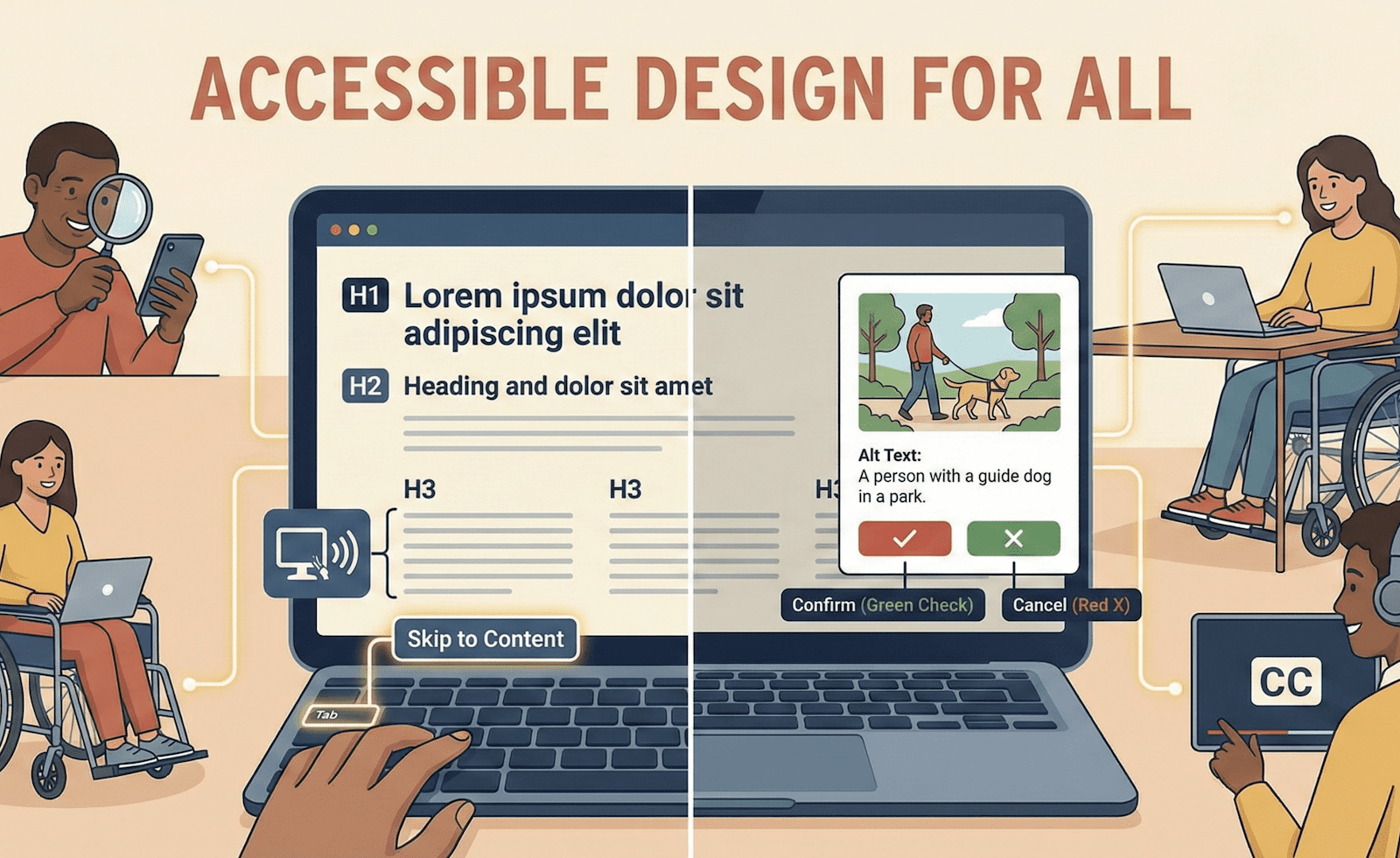
    1. Use Headings the Right Way
      Headings help users and screen readers understand the structure. Use them in order (H1, H2, H3…).
    2. Choose Readable Text and Strong Contrast
      Use easy-to-read fonts and good color contrast. Small or light text is hard to see for many users.
    3. Make Everything Work Without a Mouse
      Many people rely on the keyboard. Make sure users can tab through your product easily.
    4. Add Text for Images
      Use alt text to describe images. This helps users who can’t see them.
    5. Use More Than Just Color
      If something is red or green, also add a label or icon. This helps people who are color-blind.

    “ I will defend the absolute value of Mozart over Miley Cyrus, of course I will, but we should be wary of false dichotomies. You do not have to choose between one or the other. You can have both.”
— Stephen Fry
    How Accessibility Consultants Can Help
    Not sure where to start? That’s where accessibility consultants come in. They can:

    • Test your website or app for problems
    • Help you meet legal standards like WCAG 2.2
    • Train your team on best practices
    • Suggest design changes that work better for everyone

    Working with a consultant helps you avoid mistakes and save time.
    Accessibility Helps Everyone
    Many features we all love started as accessibility tools:

    • Captions help when videos are muted
    • Voice controls help when your hands are busy
    • Dark mode helps your eyes at night

    That’s the magic of accessible design — it makes life easier for more people, not just those with disabilities.

    Tools to use


    Use these tools to check your product’s accessibility:
    axe DevTools – Finds problems quickly in your browser
    Stark – Checks colors in design tools like Figma
    VoiceOver or NVDA – Screen readers for testing
    WAVE – Shows you where your site can improve


    Final Thoughts


    Making accessible products is good for people, good for business, and good for search engines. It helps you reach more users, build trust, and follow the law.
    Remember: accessibility is not about making your design boring. It’s about making it better for everyone. Whether you’re just starting or want expert help, accessibility consultants can guide you.
    When you focus on design accessibility, you’re designing for all.